Everything Niru does, in depth.

The console you coach from, the app your clients use every day, and how switching works.

Claim my founding seat Pricing

Card on file today. First charge in 30 days. Cancel before then and you pay nothing.

The console you coach from.

Open it in the morning and the sorting is already done: who needs you sits at the top, target changes wait for your yes, and every client is one click away.

Today: one queue, worst first

Everything that needs you lands in one list, in four lanes that keep their order: approvals, then check-ins, then clients who need attention, then billing. Inside a lane, what has waited longest comes first, and in Attention a trend heading the wrong way outranks the rest.

Clear a row once it’s handled, answer a message without leaving the queue, and if you change your mind, one key brings a cleared row back.

What lands there
Meals a client sent you to check, target changes to approve, sequence steps waiting on you, check-ins in and check-ins missed, three days without a log, a cut or bulk that has stalled, low scores on a check-in, unread messages, form checks, slipping habits and a subscription past due.
Meal reviews
A meal sent to you opens with its items and macros. Confirm the numbers, editing any you disagree with, or leave it as estimated.
The counts on top
Need attention and To review filter the queue in place. Active clients opens your roster; Unread messages opens Messages.
Keys
j and k (or the arrow keys) move through the queue, Enter opens a row, d clears it and z undoes.
Recent activity
Beside the queue, a running feed of what each client logged, meal by meal, what they trained and who weighed in.
Referral, not automation
A client set to cut who is under 18 or below a healthy BMI is flagged for you to refer on. The flag never starts an automated message.
Targets move only when you approve

Turn on Smart Targets for a client and the app measures what they actually burn, from their food logs and their weight trend, instead of estimating it from a formula. When that measurement says their maintenance has moved, you get a proposal with its working shown: what they ate, what the scale did, and where the new number would land.

Approve or dismiss. Nothing reaches the client until you decide.

How far it moves
At most 100 calories a week.
Who is ready
Clients with enough solid weeks of logging show up as ready. You switch it on client by client.
Keys
y approves, d dismisses, z undoes.
Your own numbers
Set any client’s targets yourself whenever you like: calories, or grams and percentages for each macro.

Every client on one list, everything about them on one page

Clients opens sorted by who needs you most, each row carrying adherence, weight trend, last log, phase and status. Open a client and the profile runs across seven tabs: Overview, Nutrition, Body, Training, Intake, Notes and Setup.

Overview leads with their week, day by day against each day’s target, with the days they logged, where their trend went and what moved their target.

Filters
All, at risk, needs attention and on track; or by phase: cut, maintain or bulk.
Body
Weight trend, measurements, weekly check-ins and progress photos, side by side.
Training
Their current plan beside their workout history.
Habits
Assign one from a starter list or write your own, daily or a set number of times a week. It shows on the client’s Today.
Their units
Each client’s weight reads in their own unit, so you and they quote the same number.

Messages, with their week beside the thread

Every conversation in one list. Open one and a rail beside it shows that client’s flags, their last seven days of logging, today’s macros and their weight trend, so every reply starts from the facts.

Voice notes
Record up to three minutes right from the console.
Announcements
One message to your whole roster or to the clients you pick, sent now or at a time you choose.
Scheduled
A scheduled announcement stays editable, or cancellable, until it goes.

Studio: build it once

Programs, meal plans, recipes, sequences, intake forms and what you sell all live in Studio. Each is built once and reused for every client it fits.

Workout templates, assigned in bulk

Build a program day by day: sets and reps for lifting, intervals by time, distance or level for cardio, with each movement’s demo, where it has one, a click away. Then tick the clients and assign it once.

Each client gets their own copy, so adjusting one person’s plan never touches anyone else’s. If one assignment can’t go through, the rest still do, and each row tells you what happened.

A program drafted from your rules, held until you release it

Choose the goal (hypertrophy, strength, endurance or power), the experience level, days a week, session length, equipment and anything to leave out. It drafts a full training block, and every prescription carries the reason for it and how strong the evidence is.

Edit anything, add it to your library, then assign it when you’re happy. It reaches nobody before that.

Evidence, labelled
Strong evidence, moderate evidence, or “our call” where the research doesn’t settle it.
Bounds
Two to seven days a week, 15 to 180 minutes a session.
When it can’t
If your constraints can’t make a sound program, it tells you why instead of padding one out.

Meal plans your clients log in one tap

Build a day of meals once, from your recipes or plain foods, then lay it on a client’s week, or paint one week across several clients at once. On their phone each planned meal arrives pre-filled; one tap logs it, and if they eat something else the day bends around it instead of breaking.

Edits stay put
Change a day template later and nobody’s plan moves until you send it again.
Your format
On a planned day, their meal cards follow your template: the meals, their order and each meal’s numbers.

Recipes and collections, handed over

Build recipes from real foods and group them into collections. Share a collection with a client and every recipe lands in their Saved tab, marked as from you and ready to log, as a copy of their own they can tweak without touching your original.

Feeds your meal plans
The same recipes fill the meals in your day templates.

Sequences: the routine, written once

Chain the steps you repeat with every client: a message, a task, one of your forms, a habit, or a check-in nudge. Start a sequence when a client joins, on a date, every week on a day you pick, when a red flag fires, or when their goal changes.

Steps started by a flag or a goal change wait in Today for your OK, unless you set that sequence to send on its own.

Flags that can start one
Three quiet days, a stalled weight trend, or a habit slipping.
Marked as automated
Every automated message says so in the thread, and a client gets at most one a day.
Edit it live
Improve a step and everyone still to receive it gets the new version.

Intake forms that set a client up for you

Write your onboarding questions once. A question can fill a profile field (goal, weight, height, body fat, activity or training days), so by the time a client finishes the form, their targets are already worked out.

Ready to use
A PAR-Q readiness check and a starter intake, to send as they are or edit.
Waivers
Consent questions are signed with a typed full name.
Kept as signed
A completed form keeps the questions exactly as they were answered, even if you edit the template later.
On a schedule
Put a form in a sequence and it goes out when the step comes due.

Bill your clients and see who has paid

Connect Stripe, then set up packages: a subscription or a one-time price. Clients see your packages in their app and pay on Stripe’s own checkout.

Payments lists every charge and refund, newest first. Revenue shows what’s recurring and from whom. A subscription that falls past due turns up in Today.

Our cut
None. Niru takes 0% of every client payment.

Also in the console

A few details that save clicks on a busy morning.

⌘K
Find any client, page or action from anywhere (Ctrl+K on Windows).
On your phone
Your queue, clients, messages and Studio are in the phone app too, under the same login.
Invites
Each client gets a single-use invite key to enter when they sign up.
Pounds or kilos
Your roster and dashboards in the unit you prefer; each client’s page keeps their own.

The app your clients hold.

Logging takes seconds, a heavy meal gets absorbed instead of punished, and the workout runs from their pocket.

Five ways to log, one tap apart

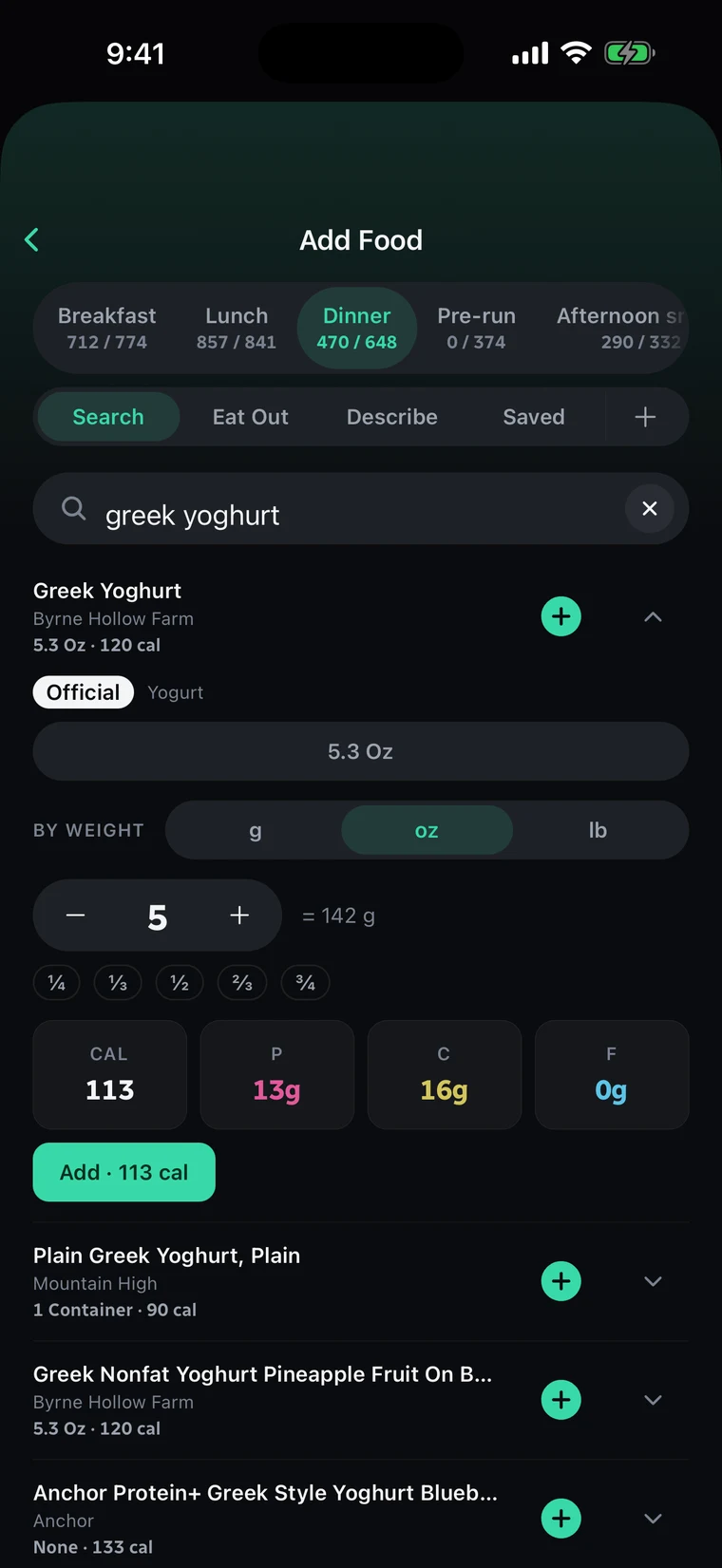
Add Food opens on their recent foods, with the ways to log across the top: Search, Eat Out, Describe, Saved, and a plus for Quick Add.

Describe it in plain words

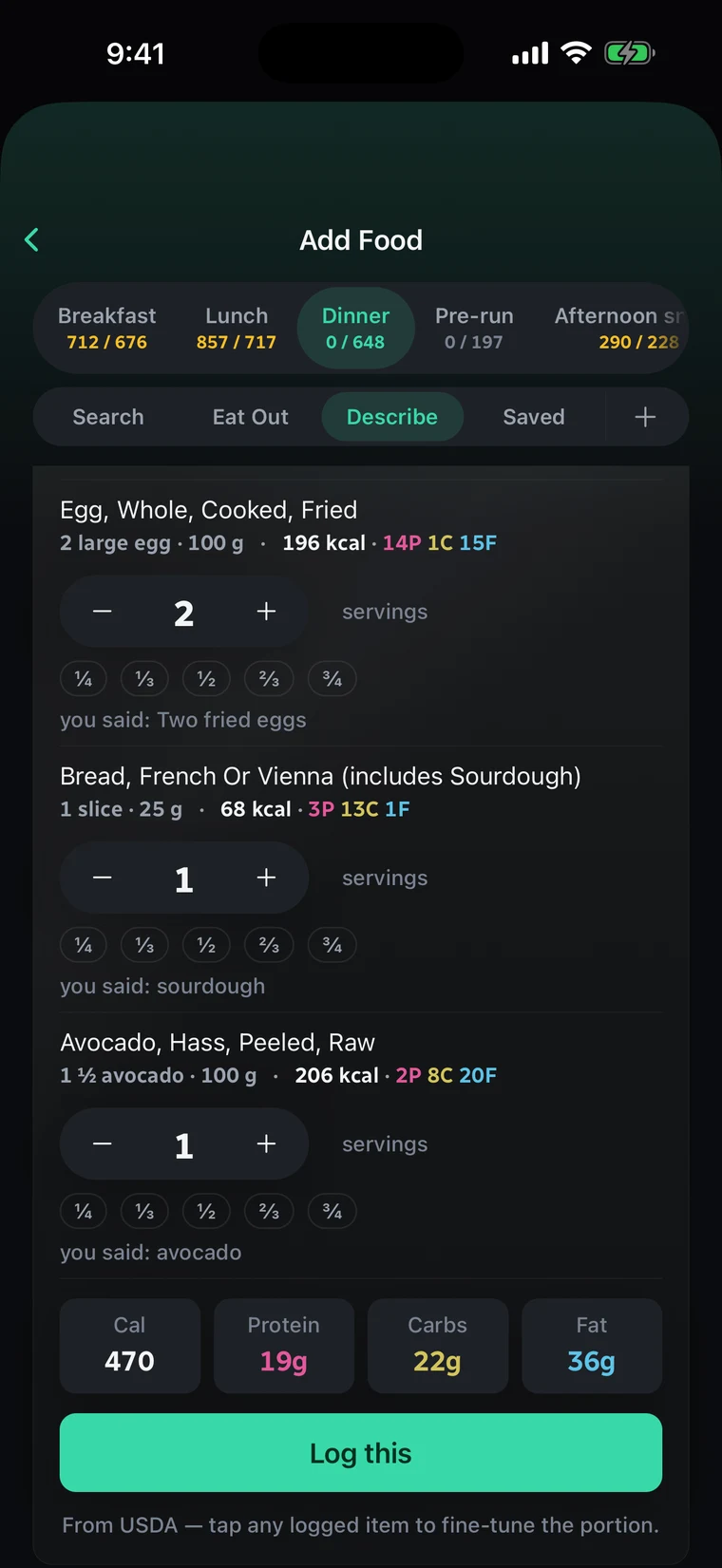
They type what they ate the way they’d text it to you. The app matches each food to a real USDA entry at a sensible portion, adds it up, and lets them adjust any serving before logging.

Real foods
Every matched item is a real USDA food, so it edits like any other food afterwards.
No match
Anything USDA can’t match falls back to an AI estimate for that item.
The Add Food screen on its Describe tab. Three foods matched from what the client said (two fried eggs, a slice of sourdough and avocado), each with a servings stepper, adding up to 470 calories: 19 g protein, 22 g carbs and 36 g fat. A Log this button sits above the line From USDA, tap any logged item to fine-tune the portion.

Eating out, handled before they order

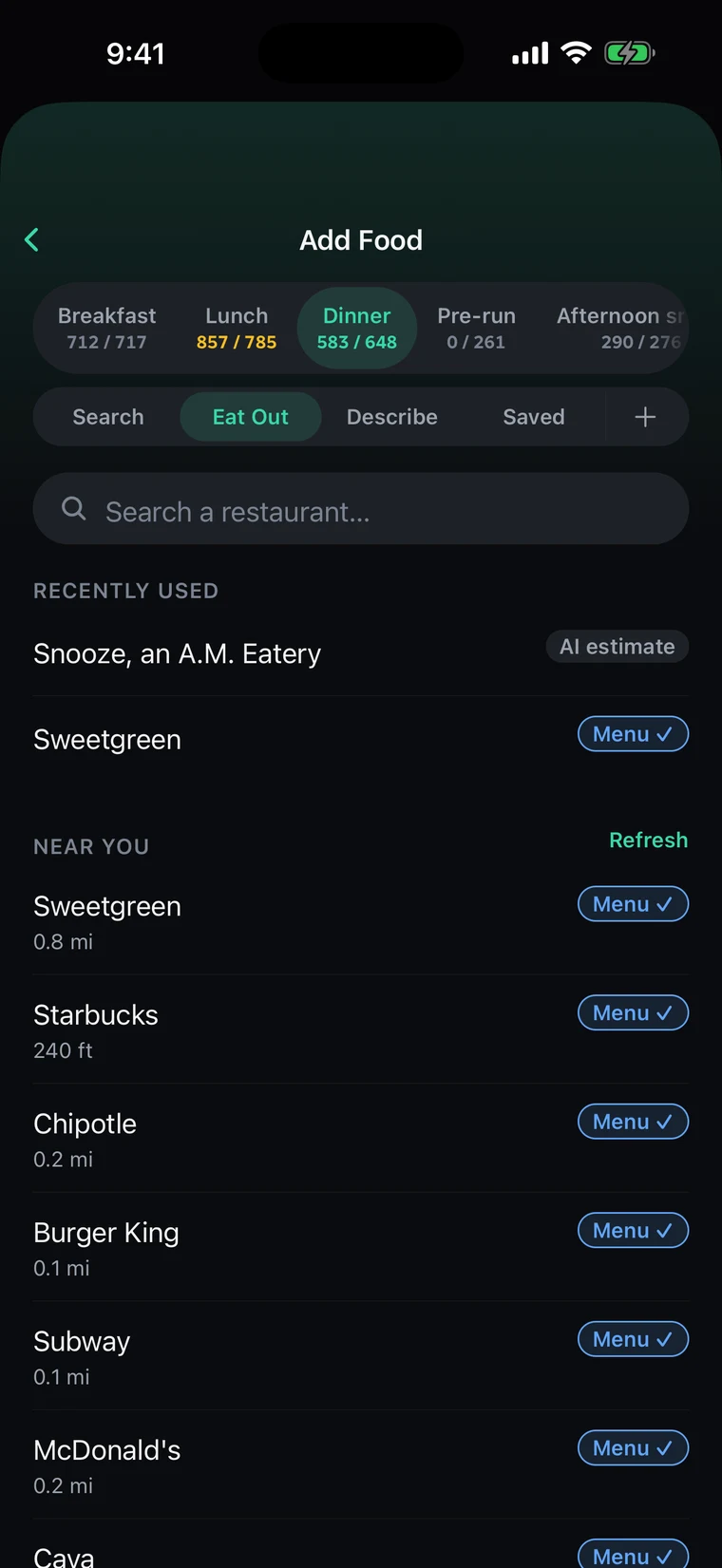
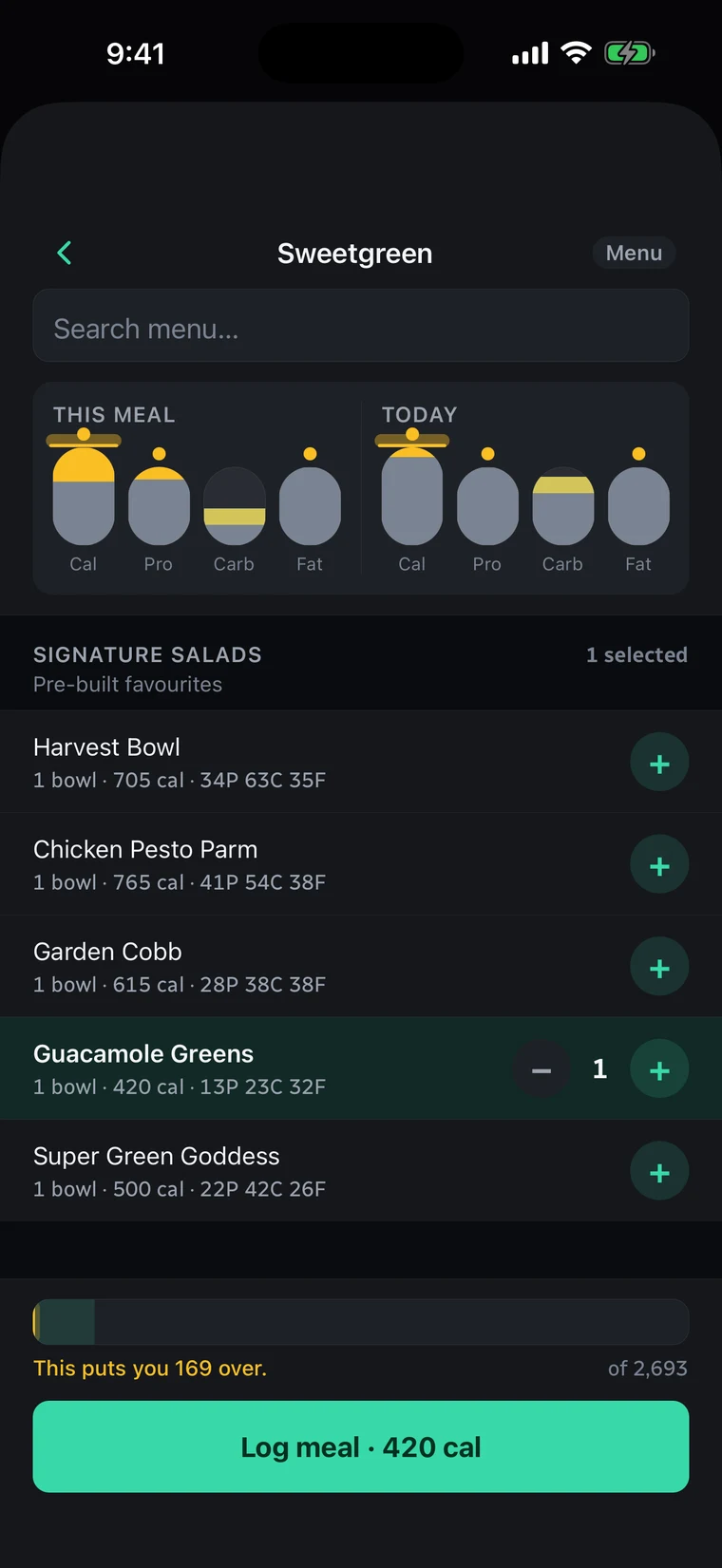
Eat Out lists the restaurants near them and the ones they’ve used lately. Chains with a menu on file wear a check: they build the meal from that menu and see what it does to the meal and to the whole day before logging it.

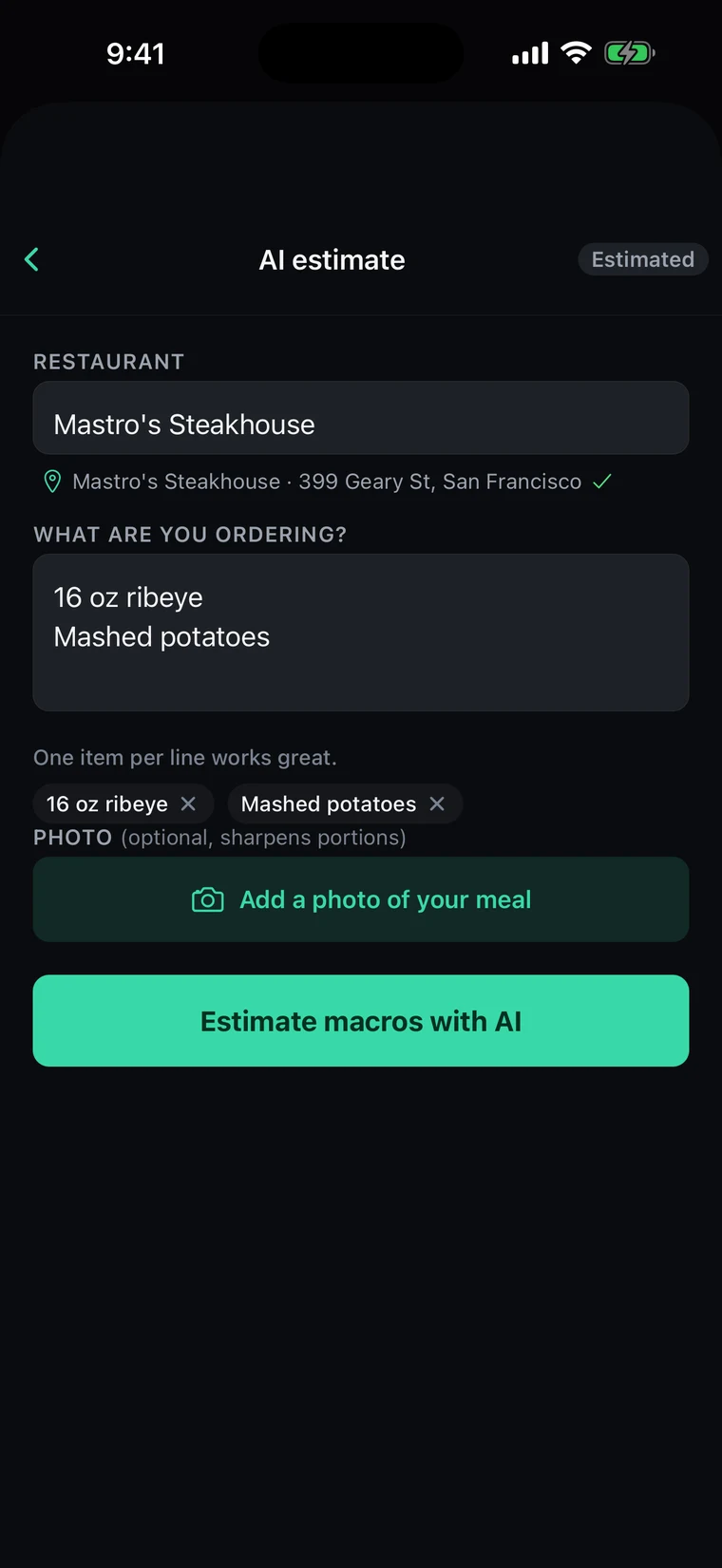
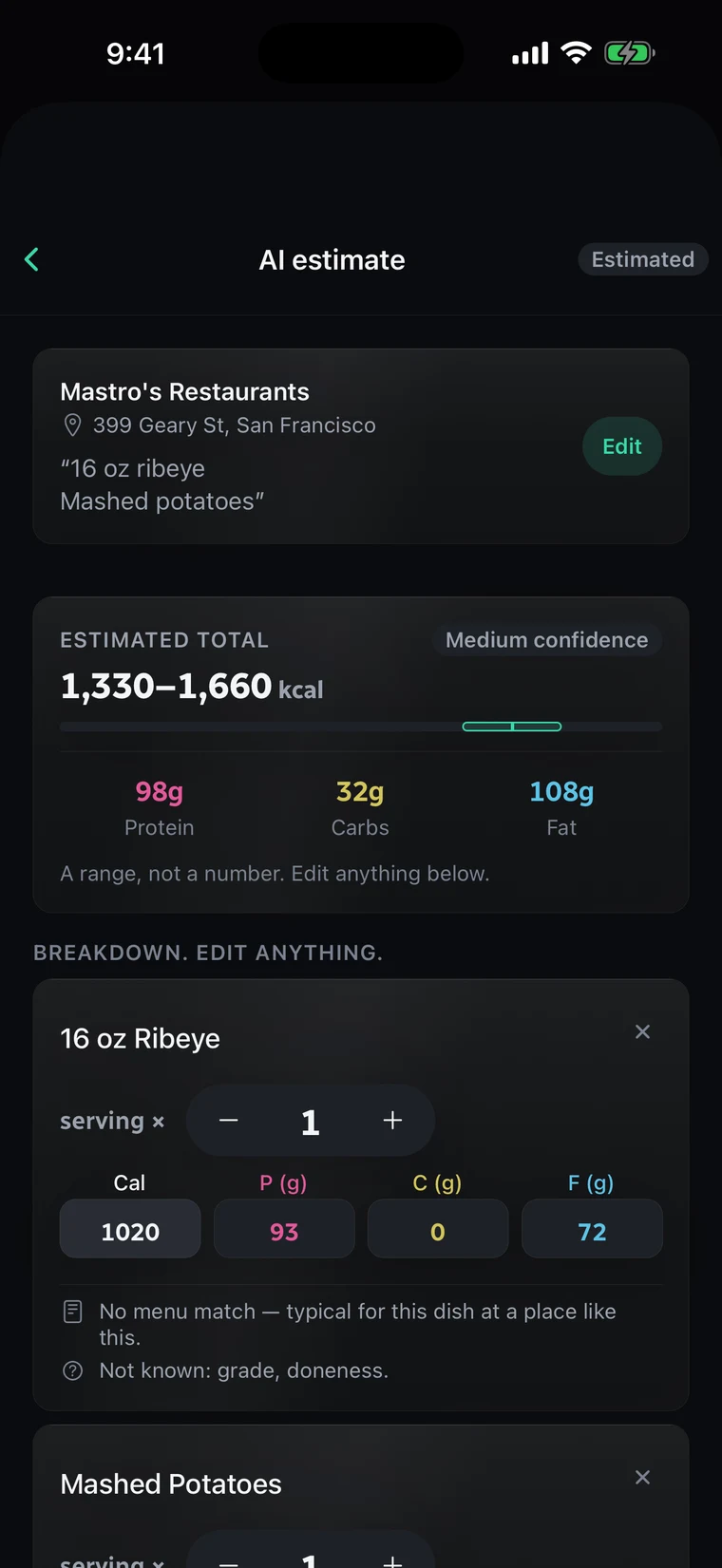
Anywhere else, they name the place, type the order and add a photo if they like. The estimate comes back as a range, split into dishes they can edit, with a plain note of what was assumed. One tick sends it to you to check.

The Add Food screen on its Eat Out tab. A search box for restaurants, two recently used places, and a Near you list (Sweetgreen, Starbucks, Chipotle, Burger King, Subway, McDonald's, Cava), each marked Menu with a check. One recent place is marked AI estimate instead.
Near them. Places nearby, with checked menus marked.
Sweetgreen's menu in the app. Two sets of gauges show calories, protein, carbs and fat for this meal and for today. Guacamole Greens is selected at 420 calories, and the bar beneath reads This puts you 169 over, of 2,693, above a Log meal button.
The real menu. The bowl against this meal and the whole day.
The AI estimate form. The restaurant, Mastro's Steakhouse, is matched to 399 Geary St, San Francisco, and the order is typed as 16 oz ribeye and mashed potatoes, one item per line, with an optional photo button and an Estimate macros with AI button.
No menu on file. They name the place and type the order.
The estimate for that order: 1,330 to 1,660 calories at medium confidence, with 98 g protein, 32 g carbs and 108 g fat, and the line A range, not a number. Edit anything below. The 16 oz ribeye is broken out with editable calories and macros and a note that no menu match was found.
A range. Split into dishes they can edit.
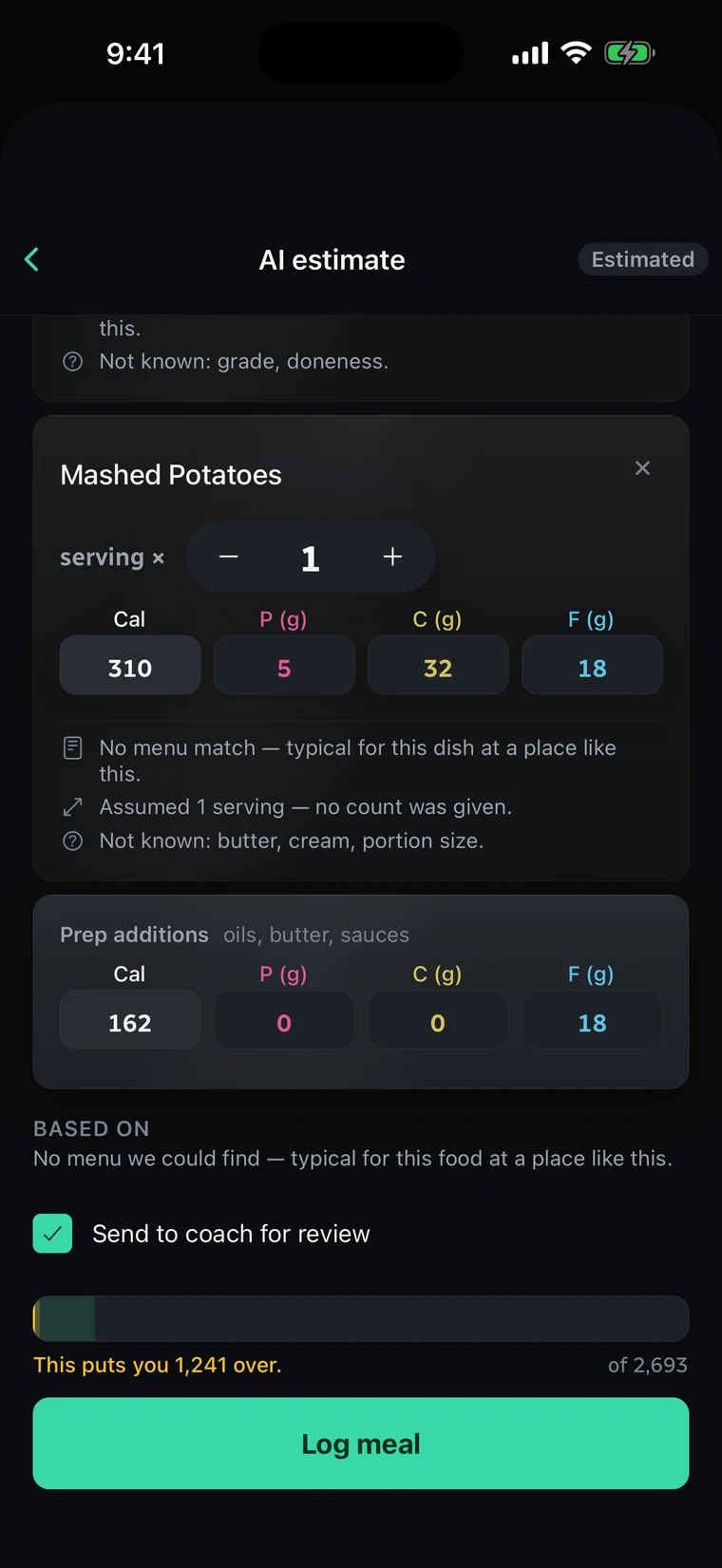
Further down the same estimate. The mashed potatoes are broken out with notes on what was assumed and what was not known, prep additions cover oils and butter, a Send to coach for review box is ticked, and the bar reads This puts you 1,241 over, of 2,693.
Its working. What was assumed, and a box that sends it to you.

Saved meals, recipes and Quick Add

The rest of Add Food, for the meals they eat on repeat and the food no database knows.

Saved meals
A meal they eat often, saved once and logged again with one tap.
Recipes
Their own, plus the ones you share, marked as from you.
Quick Add
Type calories and macros by hand, or photograph a nutrition label and check what it read before anything logs. It’s kept as their own food for next time.
Your meal plan
Days you’ve planned arrive pre-filled; one tap logs a planned meal.

A day that absorbs a heavy meal

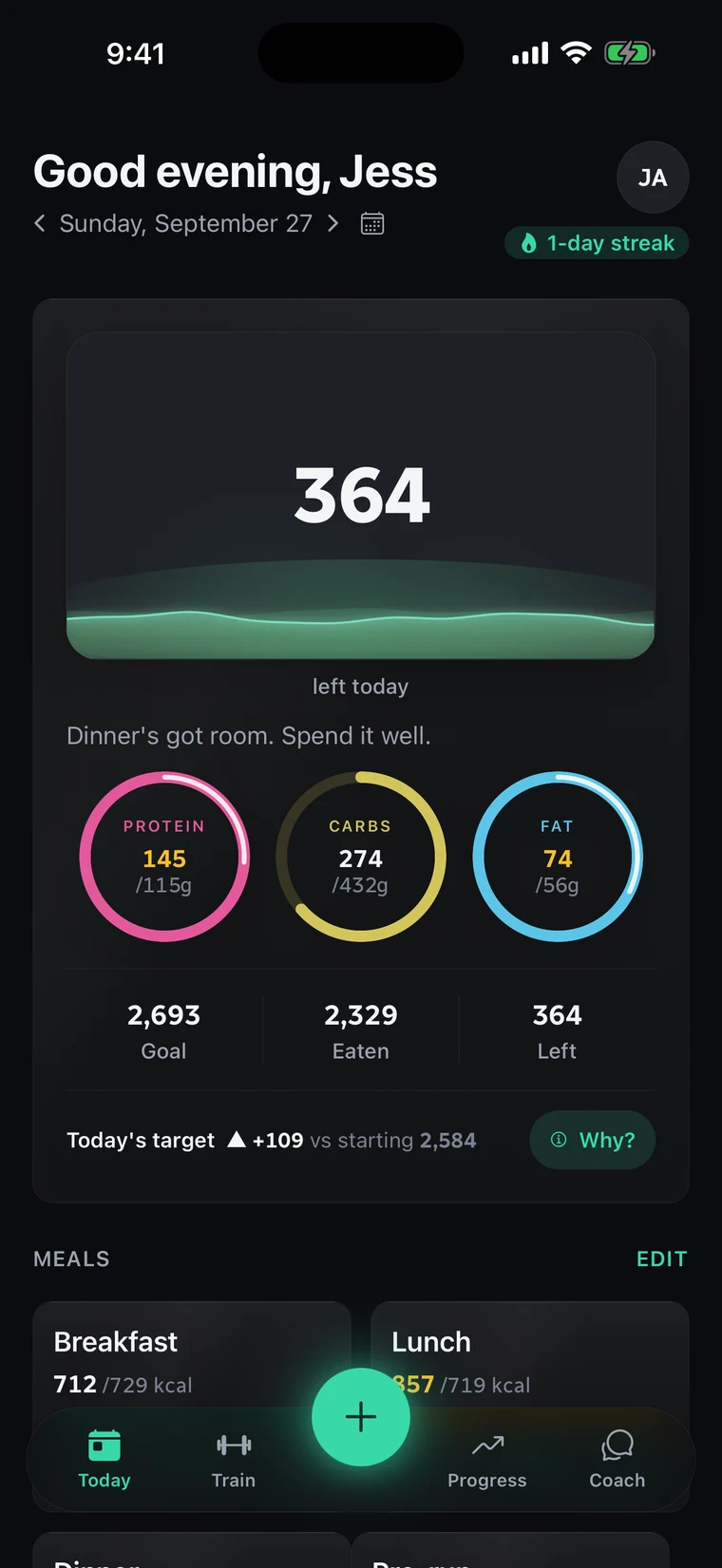
Today shows what’s left as a vessel that drains as they eat, with protein, carbs and fat in rings beneath it.

Go over and nothing turns red. The overage is spread across the next seven days, at most 300 calories off any one day and never below a safety floor, and the app says it plainly: “Over today. The week absorbs it.”

Why?
One tap and today’s target explains itself step by step, down to which day an adjustment came from and when it drops off.
On a cut
Eating under target is never banked as extra food.
On your side
The numbers stay exact in your console: an over day still reads over.
The client app's Today screen for Jess on Sunday, September 27. 364 calories left today, shown in the vessel, with rings for protein 145 of 115 g, carbs 274 of 432 g and fat 74 of 56 g. Goal 2,693, eaten 2,329, left 364. Today's target reads up 109 against a starting 2,584, beside a Why? button.

A workout player built for the gym floor

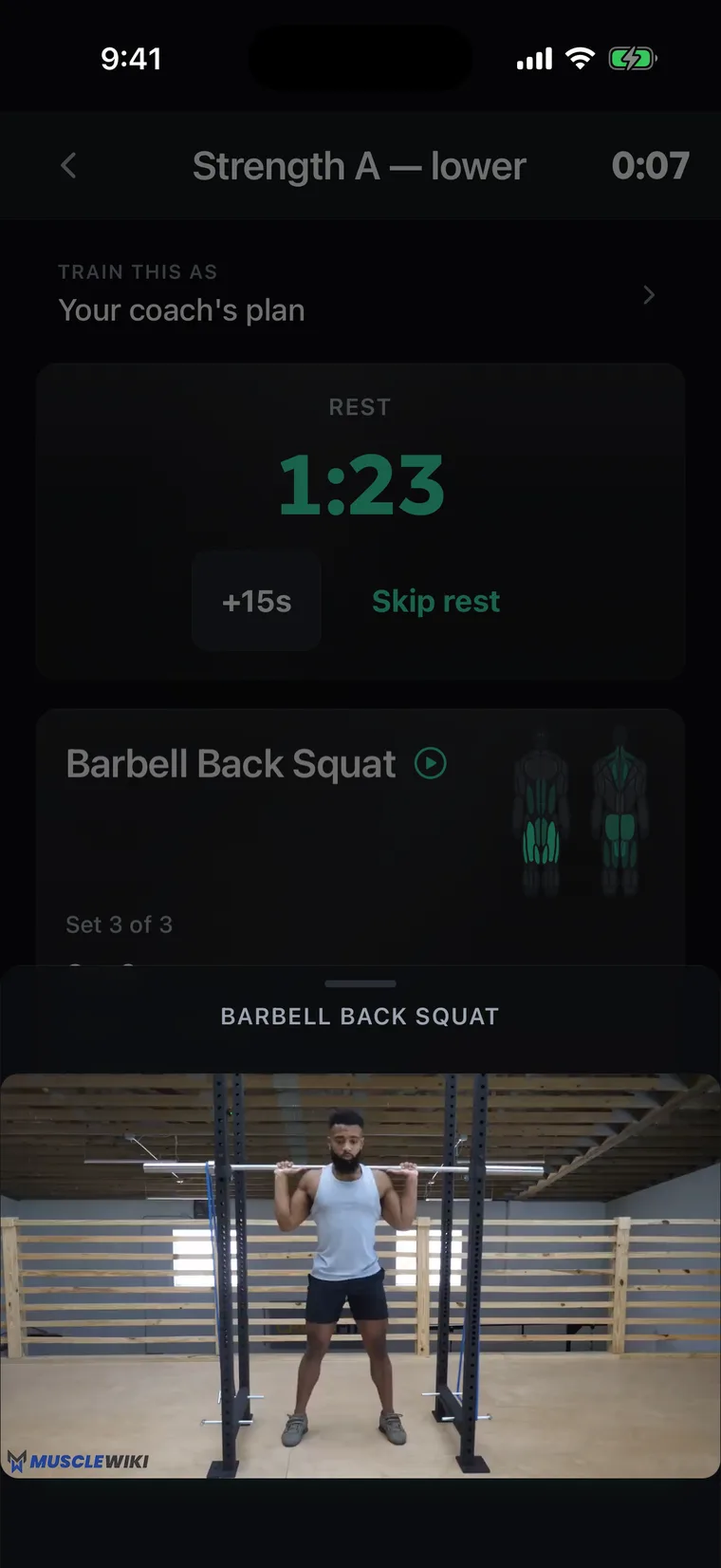
Start a session and the app runs it: a session clock, one movement and one set at a time, rest timers that start themselves and cue them when it’s time to go, and two taps to log a set.

It shows what they did last time, and when every set reached the top of the rep range, it drafts the next load for them to take or skip.

Rest timers
Start on their own after a set; a tap adds 15 seconds.
Demo videos
A movement with a demo shows a play button, and the video plays right there.
Swaps
Machine taken? They swap for the same movement on other equipment, or one with the same pattern and muscle. On a plan you wrote, a swap lasts that day only.
Personal bests
A new best is marked quietly at the end of the session, as an estimated max up from their previous best.
Strength trends
A chart for each exercise: best estimated max and total volume over time.
Day preview
Any day of the plan opens as a preview first: the muscles it works, each movement and its demo.
The workout player mid-session: the rest timer counting down after a logged set of barbell back squats, with the movement's demo video open below it.

All their progress in one place

Weigh-ins, with body fat if they know it. Girth measurements from neck to calf. Progress photos front, side and back, with a side-by-side compare. A weekly check-in that rates energy, sleep, stress and hunger. It all lands on their profile in your console.

The trend, not the noise
You see their weight as a smoothed trend line, with each weigh-in a faint dot behind it.
Private photos
Progress photos can be opened only by the client and you.

Form checks and chat, straight to you

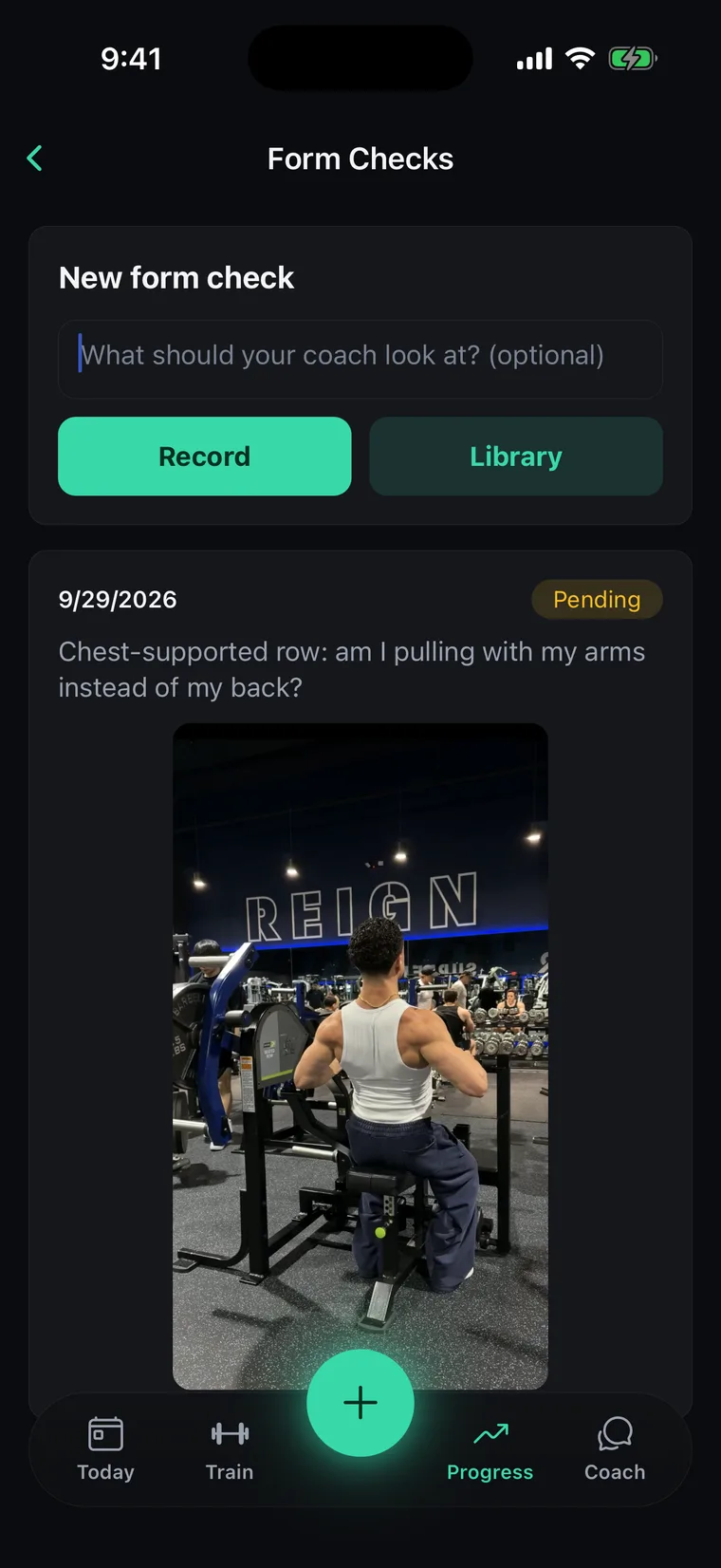
A client films a set, up to 90 seconds, adds a note and sends it. You watch it in the console, pause where the problem is, and your comment is stamped at that second; clicking a stamp jumps the video back there. They see your comments against their own clip.

Chat
Text and voice notes both ways. Clients can send photos and short clips too.
Your review queue
Waiting form checks line up oldest first, and marking one reviewed keeps the thread.
The app's form checks: a client's chest-supported row, sent to their coach with the note “Chest-supported row: am I pulling with my arms instead of my back?”, marked pending the coach's review.

Switching: I move you myself.

Claim a seat, tell me what you use today, and I move you into Niru by hand. Your first month is free while I do.

  1. Claim your seat. Card on file today. First charge in 30 days. Cancel before then and you pay nothing.
  2. Point me at your current tool. I move your clients, their plans and their history across myself.
  3. Invite your clients. Each one joins you with a single-use key.

Sonny, founder and working coach

Everything on this page, $99 a month for life.

Claim my founding seat

Card on file today. First charge in 30 days. Cancel before then and you pay nothing.